Runbooks
A runbook is written guidance your first mate and crew follow for a kind of work, such as planning a change, teaching a lesson or naming commits. It holds words, examples and pictures, and runs nothing on your computer. Infinitary comes with runbooks of its own, and you can make or add more.
Where runbooks live
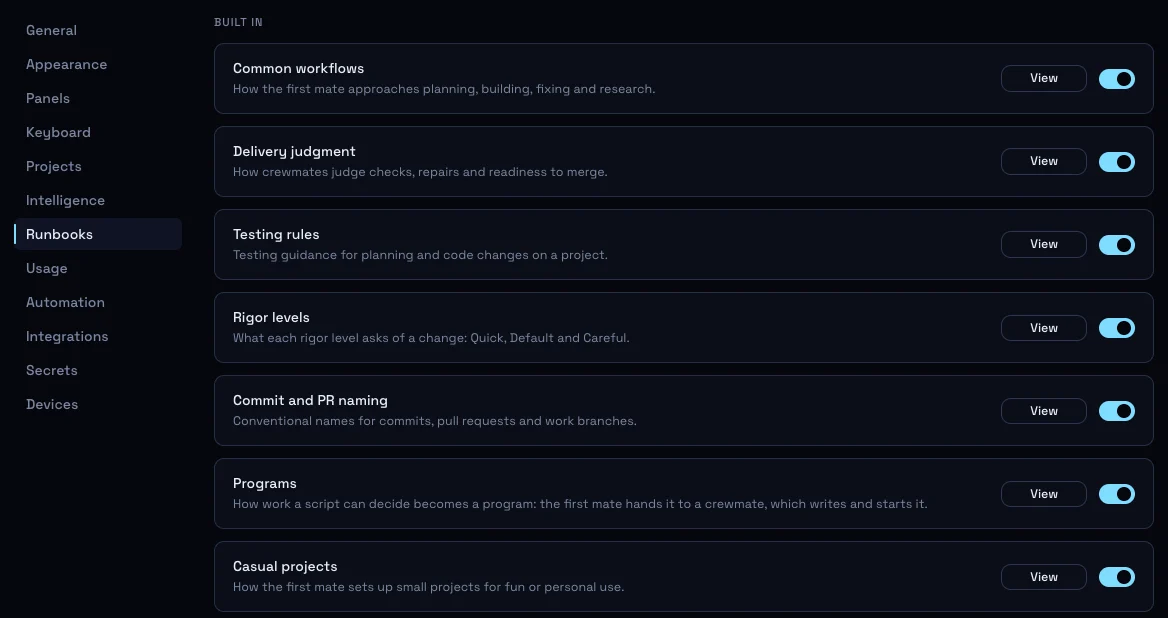
Section titled “Where runbooks live”Open Settings, then Runbooks. You can also search for Open Runbooks in the command search.
The section has three groups:
- Built in lists the runbooks that come with Infinitary.
- Yours lists the runbooks you added or made with your first mate.
- Make your own has Your runbooks folder and examples of what to ask.
Each row shows a runbook’s name, what it is for, and its switch.
Turn a runbook on or off
Section titled “Turn a runbook on or off”Use a runbook’s switch to turn it on or off. You can also ask your first mate, such as “turn off Lessons”.
Your first mate follows the change once it finishes what it is doing, and so does each crewmate that starts after it. A crewmate already at work keeps the guidance it started with.
A runbook that is off guides nobody, but it stays in the list, so you can turn it on again.
The built-in runbooks
Section titled “The built-in runbooks”Most built-in runbooks start on. Four start off until you turn them on: Batched pull requests, Pull request comments, Heartbeat and Advanced architecture.
- Common workflows: how your first mate approaches planning, building, fixing and research.
- Delivery judgment: how crewmates judge checks, repairs and when a change is ready to merge, for work that goes through a pull request.
- Testing rules: what to test when a crewmate plans or changes a project.
- Rigor levels: what each level asks of a change: Quick, Default and Careful. See Rigor.
- Commit and PR naming: how commits, pull requests and work branches are named. With it off, and no runbook of yours that names them, Infinitary checks no names.
- Programs: for work a script can split up, a crewmate writes a short script that files each part as a task of its own.
- Casual projects: how your first mate sets up small projects for fun or personal use. See What you can ask for.
- Lessons: guidance and card parts for learning a subject across days. See What you can ask for.
- Batched pull requests: merges your approved changes together as one batch pull request, so their checks run once. Turn it on to choose batched pull requests for a project in Settings → Projects. See Projects.
- Pull request comments: a crewmate answers comments on its pull request until it merges. It makes clear fixes by itself, and brings unclear ones to you as a choice.
- Outside work items: when work answers an issue, ticket or request kept outside Infinitary, a task of its own replies to that item and closes it once the work ships. Each reply or close waits for your click unless you allowed it. See A step that waits on work.
- Heartbeat: when work starts waiting with nothing to bring it up, or after a long quiet spell, your first mate looks over the waiting work, moves it on or asks you once. It brings an automation you can pause in Settings → Automation, and turning the runbook off removes it.
- Computer cleanup: a look that only reads, after you agree, and a card to choose which leftovers to stop. See What you can ask for.
- Moving secrets in: how a crewmate moves secrets from another tool into Secrets without any agent seeing a value. A crewmate reads it only during such a move. See Secrets.
- Feedback: type
/feedbackand a few words in any message box, and a crewmate drafts an issue for Infinitary’s maker that you read and publish yourself. It carries facts about the app and your system, never your names, paths or projects. - Advanced architecture: maps a project’s parts and how they connect, and shows what a change moves on that map. It is an experiment.
Infinitary does not let you turn Batched pull requests off while a project uses batched pull requests, and names that project.
Read a runbook
Section titled “Read a runbook”Press View beside a built-in runbook. It opens a read-only copy of the runbook’s folder on your computer. To change how a built-in runbook works, ask your first mate to make it yours, as below.
Make your own
Section titled “Make your own”Ask your first mate, in your own words. Make your own in Settings gives examples, such as:
- “Give every crewmate a skill for writing release notes in plain words.”
- “Make a runbook that tells the first mate I prefer short answers.”
A crewmate writes the new runbook in Your runbooks folder. It is listed under Yours and is on at once, unless you asked for it to start off.
Open folder opens Your runbooks folder on your computer. A change to a runbook there reaches your first mate and crew the same way a switch does.
Make a built-in runbook yours
Section titled “Make a built-in runbook yours”Ask your first mate to copy a built-in runbook, such as “Copy Common workflows and make it always plan before building.”
- Your first mate copies the whole runbook into Your runbooks folder, under a new name.
- The copy is listed under Yours and starts off, so nothing changes yet.
- Change the copy yourself, or ask your first mate to change it.
- Turn the copy on. The built-in one turns off at the same time.
The built-in runbook stays as it was. To go back, turn your copy off and the built-in one on.
Add a runbook someone shared
Section titled “Add a runbook someone shared”Ask your first mate to add a runbook from a web address or a folder, such as “Add the runbook at a web address or folder someone shared.”
Nothing is added until you answer its card, titled with the runbook’s name, such as “Add Release notes?”. The card names where the runbook comes from, who made it, what it reaches, and any built-in runbook it turns off.
- Add it adds the runbook and turns it on.
- Don’t add turns it down and deletes what was fetched.
A card you put aside keeps the offer waiting. An update to an added runbook asks you again on the same kind of card.
To remove an added runbook, ask your first mate to remove it by its name. A built-in runbook it turned off stays off until you turn it on again.
A runbook in Yours that Infinitary cannot read shows why, with no switch, and guides nobody until it is fixed.
From another computer
Section titled “From another computer”On a computer that controls your first mate from elsewhere, the switches change the runbooks where your first mate lives. View and Open folder work only on that computer, and the folder row names it. See Your other computers.
Use the keyboard
Section titled “Use the keyboard”Tab reaches each View button and switch. Command search has Open Runbooks and Open your runbooks folder, and you can give either a key in Settings → Keyboard. See Keyboard.